Understanding ABI Encoding for Dynamic Bytes in Solidity
Understanding ABI Encoding for Dynamic Bytes in Solidity
When dealing with dynamic types like bytes in Solidity, the EVM needs a specific way to know where the data starts and how long it is. Let's break down exactly how this works under the hood using a simple example.
The Scope & Setup
We will use a simple contract that takes dynamic bytes data and returns it directly:
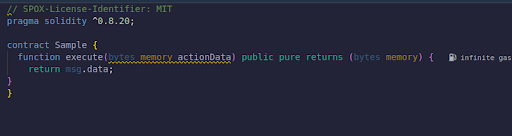
For this breakdown, we will set actionData to the following 8-byte value:
0x1122334455667788
The Raw vs. Pretty Calldata
When we execute this function, the transaction sends an encoded calldata payload that looks like a massive, unreadable string of hex characters:
0x09c5eabe000000000000000000000000000000000000000000000000000000000000002000000000000000000000000000000000000000000000000000000000000000081122334455667788000000000000000000000000000000000000000000000000
Parsing the Noise with Foundry
Because raw calldata is incredibly difficult to read by eye, we use a helper tool from Foundry:
cast pretty-calldata 0x09c5eabe0000000000000...
This command splits the chaotic string into clean, readable 32-byte chunks, making it easy to track the layout of the ABI encoding
Here is what the terminal outputs:
Terminal view
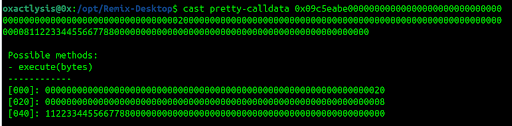
Note: The first 4 bytes 0x09c5eabe represent the function selector for execute(bytes) and it needs to be manually added to your calldata when using pretty-calldata on it.
ABI Encoding of Dynamic Parameters
The Solidity ABI encoder automatically structures dynamic parameters into two main areas: the reference (Offset) and the data section (Length + Actual Data).
1. The Offset (Chunk [000])

- How counting works: The EVM starts counting from 0 relative to the beginning of the arguments block (immediately after the 4-byte selector).
- The Reason: The value here is
0x20(which is 32 in decimal). This literally instructs the EVM: "Move 32 bytes forward from the start of the arguments block. At that exact position, you will find the dynamic data section." - Key Realization: The offset does not point directly to the raw data. Instead, it points to a region that begins with the data's length, which is then immediately followed by the raw bytes.
2. The Length (Chunk [020])

- The Reason: Because we jumped 32 bytes (
0x20) forward as instructed by the offset, we arrive at chunk[020]. This chunk specifies the size of the dynamic data. - The Value:
0x08, meaning our input data is exactly 8 bytes long (which matches0x1122334455667788).
3. The Actual Data (Chunk [040])

- The Reason: The EVM loads data immediately after reading the length size.
- Our actual 8-byte payload (
1122334455667788) sits perfectly at the front of this 32-byte slot, with the remaining slots padded out with trailing zeros to satisfy the EVM's word alignment requirements.